> ## Documentation Index
> Fetch the complete documentation index at: https://bifrost-backport-outbound-fetchers.mintlify.site/llms.txt
> Use this file to discover all available pages before exploring further.
# Google Gemini
> Google Gemini API conversion guide - request/response transformation, message conversion, tool handling, and streaming behavior
## Overview
Google Gemini's API has different structure from OpenAI. Bifrost performs extensive conversion including:
* **Role remapping** - "assistant" → "model", system messages integrated into main flow
* **Message grouping** - Consecutive tool responses merged into single user message
* **Parameter renaming** - e.g., `max_completion_tokens` → `maxOutputTokens`, `stop` → `stopSequences`
* **Function call handling** - Tool call ID preservation and thought signature support
* **Content modality** - Support for text, images, video, code execution, and thought content
* **Thinking/Reasoning** - Thinking configuration mapped to Bifrost reasoning structure
### Supported Operations
| Operation | Non-Streaming | Streaming | Endpoint |
| - | - | - | - |
| Chat Completions | ✅ | ✅ | `/v1beta/models/{model}:generateContent` |
| Responses API | ✅ | ✅ | `/v1beta/models/{model}:generateContent` |
| Speech (TTS) | ✅ | ✅ | `/v1beta/models/{model}:generateContent` |
| Transcriptions (STT) | ✅ | ✅ | `/v1beta/models/{model}:generateContent` |
| Image Generation | ✅ | - | `/v1beta/models/{model}:generateContent` or `/v1beta/models/{model}:predict` (Imagen) |
| Image Edit | ✅ | - | `/v1beta/models/{model}:generateContent` or `/v1beta/models/{model}:predict` (Imagen) |
| Video Generation | ✅ | - | `/v1beta/models/{model}:predictLongRunning` |
| Image Variation | ❌ | - | Not supported |
| Embeddings | ✅ | - | `/v1beta/models/{model}:embedContent` |
| Files | ✅ | - | `/upload/storage/v1beta/files` |
| Batch | ✅ | - | `/v1beta/batchJobs` |
| List Models | ✅ | - | `/v1beta/models` |
***
## Setup & Configuration
Configure Gemini as a provider.
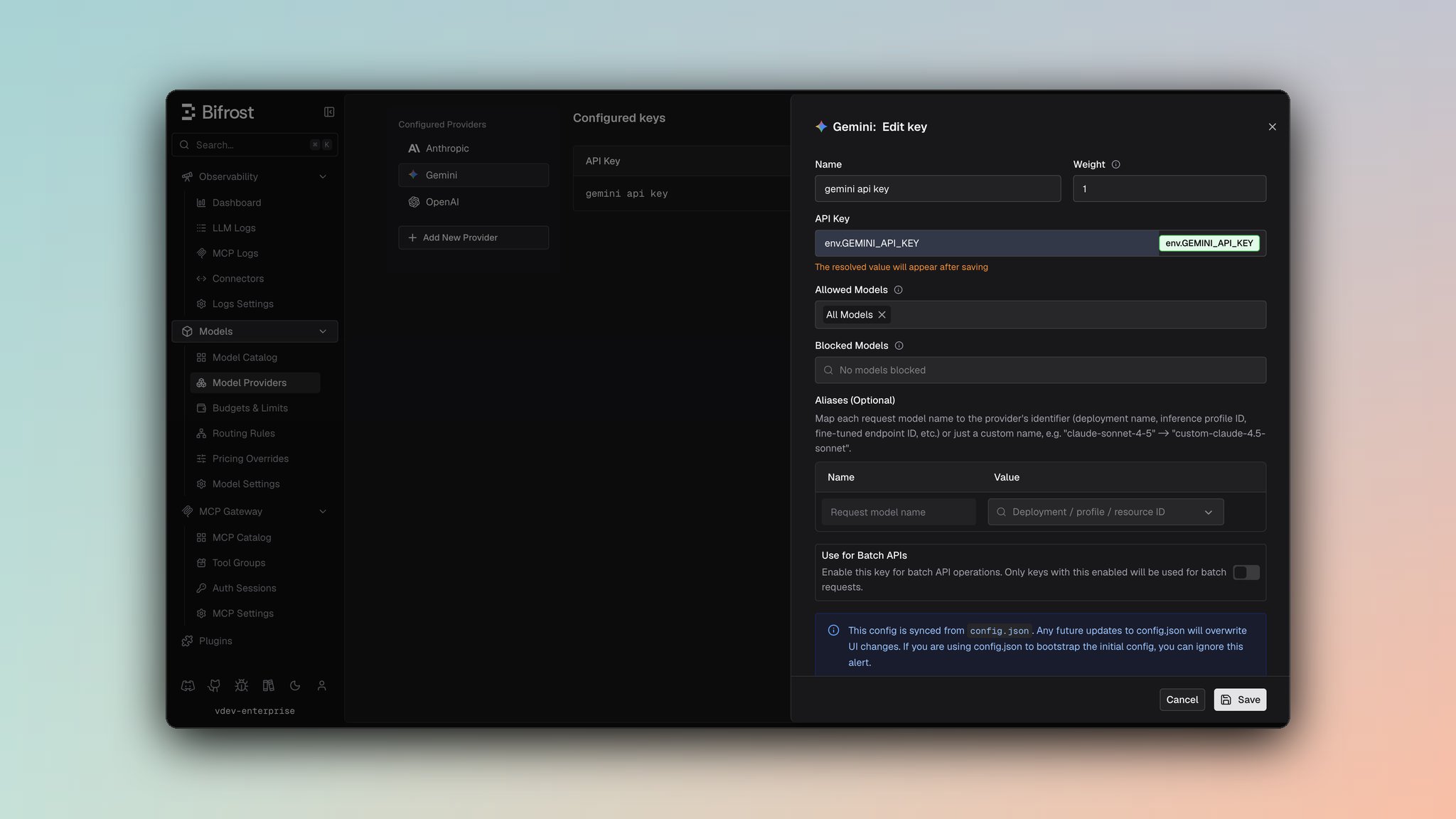 1. Navigate to **Models** > **Model Providers**. Look for **Google Gemini** under **Configured Providers**. If it is missing, click on **Add New Provider** and select **Google Gemini**.
2. Click **Add Key** or edit an existing key.
3. Set a name for your key.
4. Paste your API key directly or use an environment variable (for example, `env.GEMINI_API_KEY`).
5. Set **Allowed Models** to **All Models** (default) or the specific model allowlist you want this key to serve.
6. Save the provider configuration.
```json theme={null}
{
"providers": {
"gemini": {
"keys": [
{
"name": "gemini-key-1",
"value": "env.GEMINI_API_KEY",
"models": [
"*"
],
"weight": 1.0
}
]
}
}
}
```
Refer to the API documentation for [Provider Keys Management](https://docs.getbifrost.ai/api-reference/providers/create-a-key-for-a-provider).
```go theme={null}
case schemas.Gemini:
return []schemas.Key{{
Name: "gemini-key-1",
Value: *schemas.NewSecretVar("env.GEMINI_API_KEY"),
Models: []string{"*"},
Weight: 1.0,
}}, nil
```
Gemini uses the `x-goog-api-key` header for standard endpoints. Bifrost automatically selects query-parameter authentication where Gemini requires it, such as Imagen and custom endpoint flows.
***
## Authentication
Gemini supports API key authentication in addition to OAuth2 Bearer token authentication. The implementation conditionally uses the appropriate method based on the endpoint type.
### API Key Authentication
API key authentication is supported via two methods:
1. **Header Method** (standard Gemini endpoints):
* Format: `x-goog-api-key: YOUR_API_KEY` header
* Used for: Standard Gemini endpoints (e.g., `/v1beta/models/{model}:generateContent`)
2. **Query Parameter Method** (Imagen and custom endpoints):
* Format: `?key=YOUR_API_KEY` appended to request URLs
* Used for: Imagen models and custom endpoints
* Example: `https://generativelanguage.googleapis.com/v1beta/models/imagen-4.0-generate-001:predict?key=YOUR_API_KEY`
Bifrost automatically selects the appropriate authentication method based on the endpoint type.
***
# 1. Chat Completions
## Request Parameters
### Parameter Mapping
| Parameter | Transformation |
| - | - |
| `max_completion_tokens` | Renamed to `maxOutputTokens` |
| `temperature`, `top_p` | Direct pass-through |
| `stop` | Renamed to `stopSequences` |
| `response_format` | Converted to `responseMimeType` and `responseJsonSchema` |
| `tools` | Schema restructured (see [Tool Conversion](#tool-conversion)) |
| `tool_choice` | Mapped to `functionCallingConfig` (see [Tool Conversion](#tool-conversion)) |
| `reasoning` | Mapped to `thinkingConfig` (see [Reasoning / Thinking](#reasoning--thinking)) |
| `top_k` | Via `extra_params` (Gemini-specific) |
| `presence_penalty`, `frequency_penalty` | Via `extra_params` |
| `seed` | Via `extra_params` |
### Dropped Parameters
The following parameters are silently ignored: `logit_bias`, `logprobs`, `top_logprobs`, `parallel_tool_calls`, `service_tier`
### Extra Parameters
Use `extra_params` (SDK) or pass directly in request body (Gateway) for Gemini-specific fields:
```bash theme={null}
curl -X POST http://localhost:8080/v1/chat/completions \
-H "Content-Type: application/json" \
-d '{
"model": "gemini/gemini-2.0-flash",
"messages": [{"role": "user", "content": "Hello"}],
"top_k": 40,
"stop_sequences": ["###"]
}'
```
```go theme={null}
resp, err := client.ChatCompletionRequest(schemas.NewBifrostContext(ctx, schemas.NoDeadline), &schemas.BifrostChatRequest{
Provider: schemas.Gemini,
Model: "gemini-2.0-flash",
Input: messages,
Params: &schemas.ChatParameters{
ExtraParams: map[string]interface{}{
"top_k": 40,
"stop_sequences": []string{"###"},
},
},
})
```
## Reasoning / Thinking
**Documentation**: See [Bifrost Reasoning Reference](/providers/reasoning)
### Parameter Mapping
* `reasoning.effort` → `thinkingConfig.thinkingLevel` ("low" → `LOW`, "high" → `HIGH`)
* `reasoning.max_tokens` → `thinkingConfig.thinkingBudget` (token budget for thinking)
* `reasoning` parameter triggers `thinkingConfig.includeThoughts = true`
### Supported Thinking Levels
* `"low"` / `"minimal"` → `LOW`
* `"medium"` / `"high"` → `HIGH`
* `null` or unspecified → Based on `max_tokens`: -1 (dynamic), 0 (disabled), or specific budget
### Example
```json theme={null}
// Request
{"reasoning": {"effort": "high", "max_tokens": 10000}}
// Gemini conversion
{"thinkingConfig": {"includeThoughts": true, "thinkingLevel": "HIGH", "thinkingBudget": 10000}}
```
## Message Conversion
### Critical Caveats
* **Role remapping**: "assistant" → "model", "system" → part of user/model content flow
* **Consecutive tool responses**: Tool response messages merged into single user message with function response parts
* **Content flattening**: Multi-part content in single message preserved as parts array
### Image Conversion
* **URL images**: `{type: "image_url", image_url: {url: "..."}}` → `{type: "image", source: {type: "url", url: "..."}}`
* **Base64 images**: Data URL → `{type: "image", source: {type: "base64", media_type: "image/png", ...}}`
* **Video content**: Preserved with metadata (fps, start/end offset)
## Tool Conversion
Tool definitions are restructured with these mappings:
* `function.name` → `functionDeclarations.name` (preserved)
* `function.parameters` → `functionDeclarations.parameters` (Schema format)
* `function.description` → `functionDeclarations.description`
* `function.strict` → Dropped (not supported by Gemini)
### Tool Choice Mapping
| OpenAI | Gemini |
| - | - |
| `"auto"` | `AUTO` (default) |
| `"none"` | `NONE` |
| `"required"` | `ANY` |
| Specific tool | `ANY` with `allowedFunctionNames` |
## Response Conversion
### Field Mapping
* `finishReason` → `finish_reason`:
* `STOP` → `stop`
* `MAX_TOKENS` → `length`
* `SAFETY`, `RECITATION`, `LANGUAGE`, `BLOCKLIST`, `PROHIBITED_CONTENT`, `SPII`, `IMAGE_SAFETY` → `content_filter`
* `MALFORMED_FUNCTION_CALL`, `UNEXPECTED_TOOL_CALL` → `tool_calls`
* `candidates[0].content.parts[0].text` → `choices[0].message.content` (if single text block)
* `candidates[0].content.parts[].functionCall` → `choices[0].message.tool_calls`
* `promptTokenCount` → `usage.prompt_tokens`
* `candidatesTokenCount` → `usage.completion_tokens`
* `totalTokenCount` → `usage.total_tokens`
* `cachedContentTokenCount` → `usage.prompt_tokens_details.cached_tokens`
* `thoughtsTokenCount` → `usage.completion_tokens_details.reasoning_tokens`
* Thought content (from `text` parts with `thought: true`) → `reasoning` field in stream deltas
* Function call `args` (map) → JSON string `arguments`
## Streaming
Event structure:
* Streaming responses contain deltas in `delta.content` (text), `delta.reasoning` (thoughts), `delta.toolCalls` (function calls)
* Function responses appear as text content in the delta
* `finish_reason` only set on final chunk
* Usage metadata only included in final chunk
***
# 2. Responses API
The Responses API uses the same underlying `/generateContent` endpoint but converts between OpenAI's Responses format and Gemini's Messages format.
## Request Parameters
### Parameter Mapping
| Parameter | Transformation |
| - | - |
| `max_output_tokens` | Renamed to `maxOutputTokens` |
| `temperature`, `top_p` | Direct pass-through |
| `instructions` | Converted to system instruction text |
| `input` (string or array) | Converted to messages |
| `tools` | Schema restructured (see [Chat Completions](#1-chat-completions)) |
| `tool_choice` | Type mapped (see [Chat Completions](#1-chat-completions)) |
| `reasoning` | Mapped to `thinkingConfig` (see [Reasoning / Thinking](#reasoning--thinking)) |
| `text` | Maps to `responseMimeType` and `responseJsonSchema` |
| `stop` | Via `extra_params`, renamed to `stopSequences` |
| `top_k` | Via `extra_params` |
### Extra Parameters
Use `extra_params` (SDK) or pass directly in request body (Gateway):
```bash theme={null}
curl -X POST http://localhost:8080/v1/responses \
-H "Content-Type: application/json" \
-d '{
"model": "gemini/gemini-2.0-flash",
"input": "Hello, how are you?",
"instructions": "You are a helpful assistant.",
"top_k": 40
}'
```
```go theme={null}
resp, err := client.ResponsesRequest(schemas.NewBifrostContext(ctx, schemas.NoDeadline), &schemas.BifrostResponsesRequest{
Provider: schemas.Gemini,
Model: "gemini-2.0-flash",
Input: messages,
Params: &schemas.ResponsesParameters{
Instructions: schemas.Ptr("You are a helpful assistant."),
ExtraParams: map[string]interface{}{
"top_k": 40,
},
},
})
```
## Input & Instructions
* **Input**: String wrapped as user message or array converted to messages
* **Instructions**: Becomes system instruction (single text block)
## Tool Support
Supported types: `function`, `computer_use_preview`, `web_search`, `mcp`
Tool conversions same as [Chat Completions](#1-chat-completions) with:
* Computer tools auto-configured (if specified in Bifrost request)
* Function-based tools always enabled
## Response Conversion
* `finishReason` → `status`: `STOP`/`MAX_TOKENS`/other → `completed` | `SAFETY` → `incomplete`
* Output items conversion:
* Text parts → `message` field
* Function calls → `function_call` field
* Thought content → `reasoning` field
* Usage fields preserved with cache tokens mapped to `*_tokens_details.cached_tokens`
## Streaming
Event structure: Similar to Chat Completions streaming
* `content_part.added` emitted for text and reasoning parts
* Item IDs generated as `msg_{responseID}_item_{outputIndex}`
***
# 3. Speech (Text-to-Speech)
Speech synthesis uses the underlying chat generation endpoint with audio response modality.
## Request Parameters
| Parameter | Transformation |
| - | - |
| `input` | Text to synthesize → `contents[0].parts[0].text` |
| `voice` | Voice name → `generationConfig.speechConfig.voiceConfig.prebuiltVoiceConfig.voiceName` |
| `response_format` | Only "wav" supported (default); auto-converted from PCM |
### Voice Configuration
**Single Voice**:
```json theme={null}
{
"generationConfig": {
"responseModalities": ["AUDIO"],
"speechConfig": {
"voiceConfig": {
"prebuiltVoiceConfig": {
"voiceName": "Chant-Female"
}
}
}
}
}
```
**Multi-Speaker**:
```json theme={null}
{
"generationConfig": {
"responseModalities": ["AUDIO"],
"speechConfig": {
"multiSpeakerVoiceConfig": {
"speakerVoiceConfigs": [
{
"speaker": "Character A",
"voiceConfig": {
"prebuiltVoiceConfig": {
"voiceName": "Chant-Female"
}
}
}
]
}
}
}
}
```
## Response Conversion
* Audio data extracted from `candidates[0].content.parts[].inlineData`
* **Format conversion**: Gemini returns PCM audio (s16le, 24kHz, mono)
* **Auto-conversion**: PCM → WAV when `response_format: "wav"` (default)
* Raw audio returned if `response_format` is omitted or empty string
### Supported Voices
Common Gemini voices include:
* `Chant-Female` - Female voice
* `Chant-Male` - Male voice
* Additional voices depend on model capabilities
Check model documentation for complete list of supported voices.
***
# 4. Transcriptions (Speech-to-Text)
Transcriptions are implemented as chat completions with audio content and text prompts.
## Request Parameters
| Parameter | Transformation |
| - | - |
| `file` | Audio bytes → `contents[].parts[].inlineData` |
| `prompt` | Instructions → `contents[0].parts[0].text` (defaults to "Generate a transcript of the speech.") |
| `language` | Via `extra_params` (if supported by model) |
### Audio Input Handling
Audio is sent as inline data with auto-detected MIME type:
```json theme={null}
{
"contents": [
{
"parts": [
{
"text": ""
},
{
"inlineData": {
"mimeType": "audio/wav",
"data": ""
}
}
]
}
]
}
```
Gemini caching works differently from the rest of Bifrost's providers, so the
`prompt_cache.auto_inject` setting does **not** apply here. Anthropic-style providers
mark a content block and the cached prefix follows from where the marker sits. Gemini
instead caches through a server-side `cachedContent` **resource** that you create,
name, and pass by ID, with its own TTL and billing. There is no per-block marker for
Bifrost to add, so injecting one would do nothing. Create the resource and pass
`cachedContent` yourself. See [Prompt caching](/features/prompt-caching) for how the setting behaves
elsewhere.
### Extra Parameters
Safety settings and caching can be configured:
```bash theme={null}
curl -X POST http://localhost:8080/v1/audio/transcriptions \
-H "Content-Type: application/json" \
-d '{
"model": "gemini/gemini-2.0-flash",
"file": "",
"prompt": "Transcribe this audio in the original language."
}'
```
```go theme={null}
resp, err := client.TranscriptionRequest(schemas.NewBifrostContext(ctx, schemas.NoDeadline), &schemas.BifrostTranscriptionRequest{
Provider: schemas.Gemini,
Model: "gemini-2.0-flash",
Input: &schemas.TranscriptionInput{
File: audioBytes,
},
Params: &schemas.TranscriptionParameters{
Prompt: schemas.Ptr("Transcribe this audio."),
ExtraParams: map[string]interface{}{
"safety_settings": [...],
},
},
})
```
## Response Conversion
* Transcribed text extracted from `candidates[0].content.parts[].text`
* `task` set to `"transcribe"`
* Usage metadata mapped:
* `promptTokenCount` → `input_tokens`
* `candidatesTokenCount` → `output_tokens`
* `totalTokenCount` → `total_tokens`
***
# 5. Embeddings
Supports both single text and batch text embeddings via batch requests.
**Request Parameters**:
* `input` → `requests[0].content.parts[0].text` (single text joins arrays with space)
* `dimensions` → `outputDimensionality`
* Extra task type and title via `extra_params`
**Response Mapping**:
* `embeddings[].values` → Bifrost embedding array
* `metadata.billableCharacterCount` → Usage prompt tokens (fallback)
* Token counts extracted from usage metadata
***
# 6. Batch API
**Request formats**: Inline requests array or file-based input
**Pagination**: Token-based with `pageToken`
**Endpoints**:
* POST `/v1beta/batchJobs` - Create
* GET `/v1beta/batchJobs?pageSize={limit}&pageToken={token}` - List
* GET `/v1beta/batchJobs/{batch_id}` - Retrieve
* POST `/v1beta/batchJobs/{batch_id}:cancel` - Cancel
**Response Structure**:
* Status mapping: `BATCH_STATE_PENDING`/`BATCH_STATE_RUNNING` → `in_progress`, `BATCH_STATE_SUCCEEDED` → `completed`, `BATCH_STATE_FAILED` → `failed`, `BATCH_STATE_CANCELLING` → `cancelling`, `BATCH_STATE_CANCELLED` → `cancelled`, `BATCH_STATE_EXPIRED` → `expired`
* Inline responses: Array in `dest.inlinedResponses`
* File-based responses: JSONL file in `dest.fileName`
**Note**: RFC3339 timestamps converted to Unix timestamps
***
# 7. Files API
Supports file upload for batch processing and multimodal requests.
**Upload**: Multipart/form-data with `file` (binary) and `filename` (optional)
**Field mapping**:
* `name` → `id`
* `displayName` → `filename`
* `sizeBytes` → `size_bytes`
* `mimeType` → `content_type`
* `createTime` (RFC3339) → Converted to Unix timestamp
**Endpoints**:
* POST `/upload/storage/v1beta/files` - Upload
* GET `/v1beta/files?limit={limit}&pageToken={token}` (cursor pagination)
* GET `/v1beta/files/{file_id}` - Retrieve
* DELETE `/v1beta/files/{file_id}` - Delete
* GET `/v1beta/files/{file_id}/content` - Download
***
# 8. Image Generation
Gemini supports two image generation formats depending on the model:
1. **Standard Gemini Format**: Uses the `/v1beta/models/{model}:generateContent` endpoint
2. **Imagen Format**: Uses the `/v1beta/models/{model}:predict` endpoint for Imagen models (detected automatically)
### Parameter Mapping
| Parameter | Transformation |
| - | - |
| `prompt` | Text description of the image to generate |
| `n` | Number of images (mapped to `sampleCount` for Imagen, `candidateCount` for Gemini) |
| `size` | Image size in WxH format (e.g., `"1024x1024"`). Converted to Imagen's `imageSize` + `aspectRatio` format |
| `output_format` | Output format: `"png"`, `"jpeg"`, `"webp"`. Converted to MIME type for Imagen |
| `seed` | Seed for reproducible generation (passed directly) |
| `negative_prompt` | Negative prompt (passed directly) |
### Extra Parameters
Use `extra_params` (SDK) or pass directly in request body (Gateway) for Gemini-specific fields:
| Parameter | Type | Notes |
| - | - | - |
| `personGeneration` | string | Person generation setting (Imagen only) |
| `language` | string | Language code (Imagen only) |
| `enhancePrompt` | bool | Prompt enhancement flag (Imagen only) |
| `safetySettings` / `safety_settings` | string/array | Safety settings configuration |
| `cachedContent` / `cached_content` | string | Cached content ID |
| `labels` | object | Custom labels map |
```bash theme={null}
curl -X POST http://localhost:8080/v1/images/generations \
-H "Content-Type: application/json" \
-d '{
"model": "gemini/imagen-4.0-generate-001",
"prompt": "A sunset over the mountains",
"size": "1024x1024",
"n": 2,
"output_format": "png"
}'
```
```go theme={null}
resp, err := client.ImageGenerationRequest(schemas.NewBifrostContext(ctx, schemas.NoDeadline), &schemas.BifrostImageGenerationRequest{
Provider: schemas.Gemini,
Model: "imagen-4.0-generate-001",
Input: &schemas.ImageGenerationInput{
Prompt: "A sunset over the mountains",
},
Params: &schemas.ImageGenerationParameters{
Size: schemas.Ptr("1024x1024"),
N: schemas.Ptr(2),
OutputFormat: schemas.Ptr("png"),
},
})
```
## Request Conversion
### Standard Gemini Format
* **Model mapping**: `bifrostReq.Model` → `req.Model`, with `bifrostReq.Input.Prompt` → `req.Contents[0].Parts[0].Text`
* **Response modality**: Set by bifrost internally to `generationConfig.responseModalities = ["IMAGE"]` to indicate image generation
* **Image count**: Specify number of images via `n` → `generationConfig.candidateCount`
* **Extra parameters**: Include `safetySettings`, `cachedContent`, and `labels` mapped directly
### Imagen Format
* **Prompt**: `bifrostReq.Prompt` → `req.Instances[0].Prompt`
* **Number of Images**: `n` → `req.Parameters.SampleCount`
* **Size Conversion**: `size` (WxH format) converted to:
* `imageSize`: `"1k"` (if dimensions ≤ 1024), `"2k"` (if dimensions ≤ 2048). Sizes larger than `"2k"` are not supported by Imagen models.
* `aspectRatio`: `"1:1"`, `"3:4"`, `"4:3"`, `"9:16"`, or `"16:9"` (based on width/height ratio)
* **Output Format**: `output_format` (`"png"`, `"jpeg"`) → `parameters.outputOptions.mimeType` (`"image/png"`, `"image/jpeg"`)
* **Seed & Negative Prompt**: Passed directly to `seed` and `parameters.negativePrompt`
* **Extra Parameters**: `personGeneration`, `language`, `enhancePrompt`, `safetySettings` mapped to parameters
## Response Conversion
### Standard Gemini Format
* **Image Data**: Extracts `InlineData` from `candidates[0].content.parts[]` with MIME type `image/*`
* **Output Format**: Converts MIME type (`image/png`, `image/jpeg`, `image/webp`) → file extension (`png`, `jpeg`, `webp`)
* **Usage**: Extracts token usage from `usageMetadata`
* **Multiple Images**: Each image part becomes an `ImageData` entry in the response array
### Imagen Format
* **Image Data**: Each `prediction` in `response.predictions[]` → `ImageData` with `b64_json` from `bytesBase64Encoded`
* **Output Format**: Converts `prediction.mimeType` → file extension for `outputFormat` field (Imagen doesnt support webp)
* **Index**: Each prediction gets an `index` (0, 1, 2, ...) in the response array
## Size Conversion
For Imagen format, size is converted between formats:
**Supported Image Sizes**: `"1k"` (≤1024), `"2k"` (≤2048)
**Supported Aspect Ratios**: `"1:1"`, `"3:4"`, `"4:3"`, `"9:16"`, `"16:9"`
## Endpoint Selection
The provider automatically selects the endpoint based on model name:
* **Imagen models** (detected via `schemas.IsImagenModel()`): Uses `/v1beta/models/{model}:predict` endpoint
* **Other models**: Uses `/v1beta/models/{model}:generateContent` endpoint with image response modality
## Streaming
Image generation streaming is not supported by Gemini.
***
# 9. Image Edit
Requests use **multipart/form-data**, not JSON.
Gemini supports image editing through two different APIs depending on the model:
1. **Standard Gemini Format**: Uses the `/v1beta/models/{model}:generateContent` endpoint (for Gemini models)
2. **Imagen Format**: Uses the `/v1beta/models/{model}:predict` endpoint (for Imagen models, detected automatically)
**Request Parameters**
| Parameter | Type | Required | Notes |
| - | - | - | - |
| `model` | string | ✅ | Model identifier (Gemini or Imagen model) |
| `prompt` | string | ✅ | Text description of the edit |
| `image[]` | binary | ✅ | Image file(s) to edit (supports multiple images) |
| `mask` | binary | ❌ | Mask image file |
| `type` | string | ❌ | Edit type: `"inpainting"`, `"outpainting"`, `"inpaint_removal"`, `"bgswap"` (Imagen only) |
| `n` | int | ❌ | Number of images to generate (1-10) |
| `output_format` | string | ❌ | Output format: `"png"`, `"webp"`, `"jpeg"` |
| `output_compression` | int | ❌ | Compression level (0-100%) |
| `seed` | int | ❌ | Seed for reproducibility (via `ExtraParams["seed"]`) |
| `negative_prompt` | string | ❌ | Negative prompt (via `ExtraParams["negativePrompt"]`) |
| `guidanceScale` | int | ❌ | Guidance scale (via `ExtraParams["guidanceScale"]`, Imagen only) |
| `baseSteps` | int | ❌ | Base steps (via `ExtraParams["baseSteps"]`, Imagen only) |
| `maskMode` | string | ❌ | Mask mode (via `ExtraParams["maskMode"]`, Imagen only): `"MASK_MODE_USER_PROVIDED"`, `"MASK_MODE_BACKGROUND"`, `"MASK_MODE_FOREGROUND"`, `"MASK_MODE_SEMANTIC"` |
| `dilation` | float | ❌ | Mask dilation (via `ExtraParams["dilation"]`, Imagen only): Range \[0, 1] |
| `maskClasses` | int\[] | ❌ | Mask classes (via `ExtraParams["maskClasses"]`, Imagen only): For `MASK_MODE_SEMANTIC` |
***
**Request Conversion**
### Standard Gemini Format (Non-Imagen Models)
* **Model & Prompt**: `bifrostReq.Model` → `req.Model`, `bifrostReq.Input.Prompt` → `req.Contents[0].Parts[0].Text`
* **Images**: Each image in `bifrostReq.Input.Images` is converted to a `Part` with:
* MIME type detection (`image/jpeg`, `image/webp`, `image/png`) with fallback to `image/png`
* Base64 encoding: `image.Image` → `Part.InlineData.Data` (base64 string)
* MIME type: `Part.InlineData.MIMEType`
* **Response Modality**: `GenerationConfig.ResponseModalities` is set to `[ModalityImage]` to indicate image generation
* **Extra Parameters**: Extracted from `ExtraParams`:
* `safetySettings` / `safety_settings` → `SafetySettings`
* `cachedContent` / `cached_content` → `CachedContent`
* `labels` → `Labels` (map\[string]string)
### Imagen Format (Imagen Models)
* **Reference Images**: Each image in `bifrostReq.Input.Images` is converted to `ReferenceImage` with:
* `ReferenceType`: `"REFERENCE_TYPE_RAW"`
* `ReferenceID`: Sequential IDs starting from 1
* `ReferenceImage.BytesBase64Encoded`: Base64-encoded image data
* **Mask Configuration**: If `Params.Mask` is provided or `maskMode` is specified:
* Default `maskMode`: `"MASK_MODE_USER_PROVIDED"` when mask data is present
* `maskMode` can be overridden via `ExtraParams["maskMode"]`
* `dilation` extracted from `ExtraParams["dilation"]` (validated to range \[0, 1])
* `maskClasses` extracted from `ExtraParams["maskClasses"]` (for `MASK_MODE_SEMANTIC`)
* Mask image (if provided) is base64-encoded and added as `ReferenceType: "REFERENCE_TYPE_MASK"`
* **Edit Mode Mapping**: `Params.Type` is mapped to `EditMode`:
* `"inpainting"` → `"EDIT_MODE_INPAINT_INSERTION"`
* `"outpainting"` → `"EDIT_MODE_OUTPAINT"`
* `"inpaint_removal"` → `"EDIT_MODE_INPAINT_REMOVAL"`
* `"bgswap"` → `"EDIT_MODE_BGSWAP"`
* If `Type` is not set, `editMode` can be specified directly via `ExtraParams["editMode"]`
* **Parameters**:
* `n` → `Parameters.SampleCount`
* `output_format` → `Parameters.OutputOptions.MimeType` (converted: `"png"` → `"image/png"`, etc.)
* `output_compression` → `Parameters.OutputOptions.CompressionQuality`
* `seed` (via `ExtraParams["seed"]`) → `Parameters.Seed`
* `negativePrompt` (via `ExtraParams["negativePrompt"]`) → `Parameters.NegativePrompt`
* `guidanceScale` (via `ExtraParams["guidanceScale"]`) → `Parameters.GuidanceScale`
* `baseSteps` (via `ExtraParams["baseSteps"]`) → `Parameters.BaseSteps`
* Additional Imagen-specific parameters: `addWatermark`, `includeRaiReason`, `includeSafetyAttributes`, `personGeneration`, `safetySetting`, `language`, `storageUri`
**Response Conversion**
* **Standard Gemini Format**: Uses the same response conversion as image generation (see Image Generation section)
* **Imagen Format**: Uses the same response conversion as Imagen image generation (see Image Generation section)
**Endpoint Selection**
The provider automatically selects the endpoint based on model name:
* **Imagen models** (detected via `schemas.IsImagenModel()`): Uses `/v1beta/models/{model}:predict` endpoint
* **Other models**: Uses `/v1beta/models/{model}:generateContent` endpoint with image response modality
**Streaming**
Image edit streaming is not supported by Gemini.
**Image Variation**
Image variation is not supported by Gemini.
***
# 10. List Models
**Request**: GET `/v1beta/models?pageSize={limit}&pageToken={token}` (no body)
**Field mapping**:
* `name` (remove "models/" prefix) → `id` (add "gemini/" prefix)
* `displayName` → `name`
* `description` → `description`
* `inputTokenLimit` → `max_input_tokens`
* `outputTokenLimit` → `max_output_tokens`
* Context length = `inputTokenLimit + outputTokenLimit`
**Pagination**: Token-based with `nextPageToken`
***
# 11. Video Generation
### Generate (`POST /v1/videos`)
Requests use **JSON body (`application/json`)**.
**Request Parameters**
| Parameter | Type | Required | Notes |
| - | - | - | - |
| `model` | string | ✅ | Veo model (e.g., `veo-3.1-generate-preview`) |
| `prompt` | string | ✅ | Text description of the video |
| `input_reference` | string | ❌ | Input image for image-to-video |
| `seconds` | string | ❌ | Duration → `durationSeconds` |
| `size` | string | ❌ | Resolution → aspect ratio (`1280x720` → `16:9`, `720x1280` → `9:16`) |
| `negative_prompt` | string | ❌ | What to avoid in the video |
| `seed` | int | ❌ | Seed for reproducibility |
| `audio` | bool | ❌ | Enable audio generation → `generateAudio` |
| `video_uri` | string | ❌ | GCS video URI for video extension |
**Extra Params** (any unrecognized JSON field is forwarded as `extra_params`)
| Key | Notes |
| - | - |
| `aspectRatio` | Override the aspect ratio directly (e.g., `"16:9"`, `"9:16"`). Takes precedence over `size` |
| `resolution` | Native Gemini resolution string |
| `sampleCount` | Number of samples to generate |
| `personGeneration` | Person generation policy |
| `numberOfVideos` | Number of videos to generate |
| `storageURI` | GCS bucket for output storage |
| `compressionQuality` | Output compression quality |
| `enhancePrompt` | Auto-enhance the prompt |
| `resizeMode` | How to handle size mismatches |
| `reference_images` | Style/asset reference image objects |
| `lastFrame` | Last frame image object for interpolation |
**Response**: [`BifrostVideoGenerationResponse`](https://github.com/maximhq/bifrost/blob/main/core/schemas/videos.go) - `id`, `status`, `videos[]`
If Gemini filters content for safety, `status` is `failed` and `content_filter` describes the reason.
**Job Statuses**: `in_progress` → `completed` / `failed`
### Retrieve / Download
| Operation | Endpoint | Notes |
| - | - | - |
| Get status | `GET /v1/videos/{id}` | Polls the long-running operation |
| Download | `GET /v1/videos/{id}/content` | Downloads from GCS URI or decodes base64 video |
Video Delete, List, and Remix are not supported.
***
## Content Type Support
Bifrost supports the following content modalities through Gemini:
| Content Type | Support | Notes |
| - | - | - |
| Text | ✅ | Full support |
| Images (URL/Base64) | ✅ | Converted to `{type: "image", source: {...}}` |
| Video | ✅ | With fps, start/end offset metadata |
| Audio | ⚠️ | Via file references only |
| PDF | ✅ | Via file references |
| Code Execution | ✅ | Auto-executed with results returned |
| Thinking/Reasoning | ✅ | Thought parts marked with `thought: true` |
| Function Calls | ✅ | With optional thought signatures |
***
## Caveats
**Severity**: High
**Behavior**: Consecutive tool response messages merged into single user message
**Impact**: Message count and structure changes
**Code**: `chat.go:627-678`
**Severity**: Medium
**Behavior**: Thought content appears as `text` parts with `thought: true` flag
**Impact**: Requires checking `thought` flag to distinguish from regular text
**Code**: `chat.go:242-244, 302-304`
**Severity**: Low
**Behavior**: Tool call `args` (object) converted to `arguments` (JSON string)
**Impact**: Requires JSON parsing to access arguments
**Code**: `chat.go:101-106`
**Severity**: Low
**Behavior**: `thoughtSignature` base64 URL-safe encoded, auto-converted during unmarshal
**Impact**: Transparent to user; handled automatically
**Code**: `types.go:1048-1063`
**Severity**: Medium
**Behavior**: `finish_reason` only present in final stream chunk with usage metadata
**Impact**: Cannot determine completion until end of stream
**Code**: `chat.go:206-208, 325-328`
**Severity**: Low
**Behavior**: Cached tokens reported in `prompt_tokens_details.cached_tokens`, cannot distinguish cache creation vs read
**Impact**: Billing estimates may be approximate
**Code**: `utils.go:270-274`
**Severity**: Medium
**Behavior**: System instructions become `systemInstruction` field (separate from messages), not included in message array
**Impact**: Structure differs from OpenAI's system message approach
**Code**: `responses.go:34-46`
This documentation is built and hosted on [Mintlify](https://mintlify.com), a developer documentation platform.
1. Navigate to **Models** > **Model Providers**. Look for **Google Gemini** under **Configured Providers**. If it is missing, click on **Add New Provider** and select **Google Gemini**.
2. Click **Add Key** or edit an existing key.
3. Set a name for your key.
4. Paste your API key directly or use an environment variable (for example, `env.GEMINI_API_KEY`).
5. Set **Allowed Models** to **All Models** (default) or the specific model allowlist you want this key to serve.
6. Save the provider configuration.
```json theme={null}
{
"providers": {
"gemini": {
"keys": [
{
"name": "gemini-key-1",
"value": "env.GEMINI_API_KEY",
"models": [
"*"
],
"weight": 1.0
}
]
}
}
}
```
Refer to the API documentation for [Provider Keys Management](https://docs.getbifrost.ai/api-reference/providers/create-a-key-for-a-provider).
```go theme={null}
case schemas.Gemini:
return []schemas.Key{{
Name: "gemini-key-1",
Value: *schemas.NewSecretVar("env.GEMINI_API_KEY"),
Models: []string{"*"},
Weight: 1.0,
}}, nil
```
Gemini uses the `x-goog-api-key` header for standard endpoints. Bifrost automatically selects query-parameter authentication where Gemini requires it, such as Imagen and custom endpoint flows.
***
## Authentication
Gemini supports API key authentication in addition to OAuth2 Bearer token authentication. The implementation conditionally uses the appropriate method based on the endpoint type.
### API Key Authentication
API key authentication is supported via two methods:
1. **Header Method** (standard Gemini endpoints):
* Format: `x-goog-api-key: YOUR_API_KEY` header
* Used for: Standard Gemini endpoints (e.g., `/v1beta/models/{model}:generateContent`)
2. **Query Parameter Method** (Imagen and custom endpoints):
* Format: `?key=YOUR_API_KEY` appended to request URLs
* Used for: Imagen models and custom endpoints
* Example: `https://generativelanguage.googleapis.com/v1beta/models/imagen-4.0-generate-001:predict?key=YOUR_API_KEY`
Bifrost automatically selects the appropriate authentication method based on the endpoint type.
***
# 1. Chat Completions
## Request Parameters
### Parameter Mapping
| Parameter | Transformation |
| - | - |
| `max_completion_tokens` | Renamed to `maxOutputTokens` |
| `temperature`, `top_p` | Direct pass-through |
| `stop` | Renamed to `stopSequences` |
| `response_format` | Converted to `responseMimeType` and `responseJsonSchema` |
| `tools` | Schema restructured (see [Tool Conversion](#tool-conversion)) |
| `tool_choice` | Mapped to `functionCallingConfig` (see [Tool Conversion](#tool-conversion)) |
| `reasoning` | Mapped to `thinkingConfig` (see [Reasoning / Thinking](#reasoning--thinking)) |
| `top_k` | Via `extra_params` (Gemini-specific) |
| `presence_penalty`, `frequency_penalty` | Via `extra_params` |
| `seed` | Via `extra_params` |
### Dropped Parameters
The following parameters are silently ignored: `logit_bias`, `logprobs`, `top_logprobs`, `parallel_tool_calls`, `service_tier`
### Extra Parameters
Use `extra_params` (SDK) or pass directly in request body (Gateway) for Gemini-specific fields:
```bash theme={null}
curl -X POST http://localhost:8080/v1/chat/completions \
-H "Content-Type: application/json" \
-d '{
"model": "gemini/gemini-2.0-flash",
"messages": [{"role": "user", "content": "Hello"}],
"top_k": 40,
"stop_sequences": ["###"]
}'
```
```go theme={null}
resp, err := client.ChatCompletionRequest(schemas.NewBifrostContext(ctx, schemas.NoDeadline), &schemas.BifrostChatRequest{
Provider: schemas.Gemini,
Model: "gemini-2.0-flash",
Input: messages,
Params: &schemas.ChatParameters{
ExtraParams: map[string]interface{}{
"top_k": 40,
"stop_sequences": []string{"###"},
},
},
})
```
## Reasoning / Thinking
**Documentation**: See [Bifrost Reasoning Reference](/providers/reasoning)
### Parameter Mapping
* `reasoning.effort` → `thinkingConfig.thinkingLevel` ("low" → `LOW`, "high" → `HIGH`)
* `reasoning.max_tokens` → `thinkingConfig.thinkingBudget` (token budget for thinking)
* `reasoning` parameter triggers `thinkingConfig.includeThoughts = true`
### Supported Thinking Levels
* `"low"` / `"minimal"` → `LOW`
* `"medium"` / `"high"` → `HIGH`
* `null` or unspecified → Based on `max_tokens`: -1 (dynamic), 0 (disabled), or specific budget
### Example
```json theme={null}
// Request
{"reasoning": {"effort": "high", "max_tokens": 10000}}
// Gemini conversion
{"thinkingConfig": {"includeThoughts": true, "thinkingLevel": "HIGH", "thinkingBudget": 10000}}
```
## Message Conversion
### Critical Caveats
* **Role remapping**: "assistant" → "model", "system" → part of user/model content flow
* **Consecutive tool responses**: Tool response messages merged into single user message with function response parts
* **Content flattening**: Multi-part content in single message preserved as parts array
### Image Conversion
* **URL images**: `{type: "image_url", image_url: {url: "..."}}` → `{type: "image", source: {type: "url", url: "..."}}`
* **Base64 images**: Data URL → `{type: "image", source: {type: "base64", media_type: "image/png", ...}}`
* **Video content**: Preserved with metadata (fps, start/end offset)
## Tool Conversion
Tool definitions are restructured with these mappings:
* `function.name` → `functionDeclarations.name` (preserved)
* `function.parameters` → `functionDeclarations.parameters` (Schema format)
* `function.description` → `functionDeclarations.description`
* `function.strict` → Dropped (not supported by Gemini)
### Tool Choice Mapping
| OpenAI | Gemini |
| - | - |
| `"auto"` | `AUTO` (default) |
| `"none"` | `NONE` |
| `"required"` | `ANY` |
| Specific tool | `ANY` with `allowedFunctionNames` |
## Response Conversion
### Field Mapping
* `finishReason` → `finish_reason`:
* `STOP` → `stop`
* `MAX_TOKENS` → `length`
* `SAFETY`, `RECITATION`, `LANGUAGE`, `BLOCKLIST`, `PROHIBITED_CONTENT`, `SPII`, `IMAGE_SAFETY` → `content_filter`
* `MALFORMED_FUNCTION_CALL`, `UNEXPECTED_TOOL_CALL` → `tool_calls`
* `candidates[0].content.parts[0].text` → `choices[0].message.content` (if single text block)
* `candidates[0].content.parts[].functionCall` → `choices[0].message.tool_calls`
* `promptTokenCount` → `usage.prompt_tokens`
* `candidatesTokenCount` → `usage.completion_tokens`
* `totalTokenCount` → `usage.total_tokens`
* `cachedContentTokenCount` → `usage.prompt_tokens_details.cached_tokens`
* `thoughtsTokenCount` → `usage.completion_tokens_details.reasoning_tokens`
* Thought content (from `text` parts with `thought: true`) → `reasoning` field in stream deltas
* Function call `args` (map) → JSON string `arguments`
## Streaming
Event structure:
* Streaming responses contain deltas in `delta.content` (text), `delta.reasoning` (thoughts), `delta.toolCalls` (function calls)
* Function responses appear as text content in the delta
* `finish_reason` only set on final chunk
* Usage metadata only included in final chunk
***
# 2. Responses API
The Responses API uses the same underlying `/generateContent` endpoint but converts between OpenAI's Responses format and Gemini's Messages format.
## Request Parameters
### Parameter Mapping
| Parameter | Transformation |
| - | - |
| `max_output_tokens` | Renamed to `maxOutputTokens` |
| `temperature`, `top_p` | Direct pass-through |
| `instructions` | Converted to system instruction text |
| `input` (string or array) | Converted to messages |
| `tools` | Schema restructured (see [Chat Completions](#1-chat-completions)) |
| `tool_choice` | Type mapped (see [Chat Completions](#1-chat-completions)) |
| `reasoning` | Mapped to `thinkingConfig` (see [Reasoning / Thinking](#reasoning--thinking)) |
| `text` | Maps to `responseMimeType` and `responseJsonSchema` |
| `stop` | Via `extra_params`, renamed to `stopSequences` |
| `top_k` | Via `extra_params` |
### Extra Parameters
Use `extra_params` (SDK) or pass directly in request body (Gateway):
```bash theme={null}
curl -X POST http://localhost:8080/v1/responses \
-H "Content-Type: application/json" \
-d '{
"model": "gemini/gemini-2.0-flash",
"input": "Hello, how are you?",
"instructions": "You are a helpful assistant.",
"top_k": 40
}'
```
```go theme={null}
resp, err := client.ResponsesRequest(schemas.NewBifrostContext(ctx, schemas.NoDeadline), &schemas.BifrostResponsesRequest{
Provider: schemas.Gemini,
Model: "gemini-2.0-flash",
Input: messages,
Params: &schemas.ResponsesParameters{
Instructions: schemas.Ptr("You are a helpful assistant."),
ExtraParams: map[string]interface{}{
"top_k": 40,
},
},
})
```
## Input & Instructions
* **Input**: String wrapped as user message or array converted to messages
* **Instructions**: Becomes system instruction (single text block)
## Tool Support
Supported types: `function`, `computer_use_preview`, `web_search`, `mcp`
Tool conversions same as [Chat Completions](#1-chat-completions) with:
* Computer tools auto-configured (if specified in Bifrost request)
* Function-based tools always enabled
## Response Conversion
* `finishReason` → `status`: `STOP`/`MAX_TOKENS`/other → `completed` | `SAFETY` → `incomplete`
* Output items conversion:
* Text parts → `message` field
* Function calls → `function_call` field
* Thought content → `reasoning` field
* Usage fields preserved with cache tokens mapped to `*_tokens_details.cached_tokens`
## Streaming
Event structure: Similar to Chat Completions streaming
* `content_part.added` emitted for text and reasoning parts
* Item IDs generated as `msg_{responseID}_item_{outputIndex}`
***
# 3. Speech (Text-to-Speech)
Speech synthesis uses the underlying chat generation endpoint with audio response modality.
## Request Parameters
| Parameter | Transformation |
| - | - |
| `input` | Text to synthesize → `contents[0].parts[0].text` |
| `voice` | Voice name → `generationConfig.speechConfig.voiceConfig.prebuiltVoiceConfig.voiceName` |
| `response_format` | Only "wav" supported (default); auto-converted from PCM |
### Voice Configuration
**Single Voice**:
```json theme={null}
{
"generationConfig": {
"responseModalities": ["AUDIO"],
"speechConfig": {
"voiceConfig": {
"prebuiltVoiceConfig": {
"voiceName": "Chant-Female"
}
}
}
}
}
```
**Multi-Speaker**:
```json theme={null}
{
"generationConfig": {
"responseModalities": ["AUDIO"],
"speechConfig": {
"multiSpeakerVoiceConfig": {
"speakerVoiceConfigs": [
{
"speaker": "Character A",
"voiceConfig": {
"prebuiltVoiceConfig": {
"voiceName": "Chant-Female"
}
}
}
]
}
}
}
}
```
## Response Conversion
* Audio data extracted from `candidates[0].content.parts[].inlineData`
* **Format conversion**: Gemini returns PCM audio (s16le, 24kHz, mono)
* **Auto-conversion**: PCM → WAV when `response_format: "wav"` (default)
* Raw audio returned if `response_format` is omitted or empty string
### Supported Voices
Common Gemini voices include:
* `Chant-Female` - Female voice
* `Chant-Male` - Male voice
* Additional voices depend on model capabilities
Check model documentation for complete list of supported voices.
***
# 4. Transcriptions (Speech-to-Text)
Transcriptions are implemented as chat completions with audio content and text prompts.
## Request Parameters
| Parameter | Transformation |
| - | - |
| `file` | Audio bytes → `contents[].parts[].inlineData` |
| `prompt` | Instructions → `contents[0].parts[0].text` (defaults to "Generate a transcript of the speech.") |
| `language` | Via `extra_params` (if supported by model) |
### Audio Input Handling
Audio is sent as inline data with auto-detected MIME type:
```json theme={null}
{
"contents": [
{
"parts": [
{
"text": ""
},
{
"inlineData": {
"mimeType": "audio/wav",
"data": ""
}
}
]
}
]
}
```
Gemini caching works differently from the rest of Bifrost's providers, so the
`prompt_cache.auto_inject` setting does **not** apply here. Anthropic-style providers
mark a content block and the cached prefix follows from where the marker sits. Gemini
instead caches through a server-side `cachedContent` **resource** that you create,
name, and pass by ID, with its own TTL and billing. There is no per-block marker for
Bifrost to add, so injecting one would do nothing. Create the resource and pass
`cachedContent` yourself. See [Prompt caching](/features/prompt-caching) for how the setting behaves
elsewhere.
### Extra Parameters
Safety settings and caching can be configured:
```bash theme={null}
curl -X POST http://localhost:8080/v1/audio/transcriptions \
-H "Content-Type: application/json" \
-d '{
"model": "gemini/gemini-2.0-flash",
"file": "",
"prompt": "Transcribe this audio in the original language."
}'
```
```go theme={null}
resp, err := client.TranscriptionRequest(schemas.NewBifrostContext(ctx, schemas.NoDeadline), &schemas.BifrostTranscriptionRequest{
Provider: schemas.Gemini,
Model: "gemini-2.0-flash",
Input: &schemas.TranscriptionInput{
File: audioBytes,
},
Params: &schemas.TranscriptionParameters{
Prompt: schemas.Ptr("Transcribe this audio."),
ExtraParams: map[string]interface{}{
"safety_settings": [...],
},
},
})
```
## Response Conversion
* Transcribed text extracted from `candidates[0].content.parts[].text`
* `task` set to `"transcribe"`
* Usage metadata mapped:
* `promptTokenCount` → `input_tokens`
* `candidatesTokenCount` → `output_tokens`
* `totalTokenCount` → `total_tokens`
***
# 5. Embeddings
Supports both single text and batch text embeddings via batch requests.
**Request Parameters**:
* `input` → `requests[0].content.parts[0].text` (single text joins arrays with space)
* `dimensions` → `outputDimensionality`
* Extra task type and title via `extra_params`
**Response Mapping**:
* `embeddings[].values` → Bifrost embedding array
* `metadata.billableCharacterCount` → Usage prompt tokens (fallback)
* Token counts extracted from usage metadata
***
# 6. Batch API
**Request formats**: Inline requests array or file-based input
**Pagination**: Token-based with `pageToken`
**Endpoints**:
* POST `/v1beta/batchJobs` - Create
* GET `/v1beta/batchJobs?pageSize={limit}&pageToken={token}` - List
* GET `/v1beta/batchJobs/{batch_id}` - Retrieve
* POST `/v1beta/batchJobs/{batch_id}:cancel` - Cancel
**Response Structure**:
* Status mapping: `BATCH_STATE_PENDING`/`BATCH_STATE_RUNNING` → `in_progress`, `BATCH_STATE_SUCCEEDED` → `completed`, `BATCH_STATE_FAILED` → `failed`, `BATCH_STATE_CANCELLING` → `cancelling`, `BATCH_STATE_CANCELLED` → `cancelled`, `BATCH_STATE_EXPIRED` → `expired`
* Inline responses: Array in `dest.inlinedResponses`
* File-based responses: JSONL file in `dest.fileName`
**Note**: RFC3339 timestamps converted to Unix timestamps
***
# 7. Files API
Supports file upload for batch processing and multimodal requests.
**Upload**: Multipart/form-data with `file` (binary) and `filename` (optional)
**Field mapping**:
* `name` → `id`
* `displayName` → `filename`
* `sizeBytes` → `size_bytes`
* `mimeType` → `content_type`
* `createTime` (RFC3339) → Converted to Unix timestamp
**Endpoints**:
* POST `/upload/storage/v1beta/files` - Upload
* GET `/v1beta/files?limit={limit}&pageToken={token}` (cursor pagination)
* GET `/v1beta/files/{file_id}` - Retrieve
* DELETE `/v1beta/files/{file_id}` - Delete
* GET `/v1beta/files/{file_id}/content` - Download
***
# 8. Image Generation
Gemini supports two image generation formats depending on the model:
1. **Standard Gemini Format**: Uses the `/v1beta/models/{model}:generateContent` endpoint
2. **Imagen Format**: Uses the `/v1beta/models/{model}:predict` endpoint for Imagen models (detected automatically)
### Parameter Mapping
| Parameter | Transformation |
| - | - |
| `prompt` | Text description of the image to generate |
| `n` | Number of images (mapped to `sampleCount` for Imagen, `candidateCount` for Gemini) |
| `size` | Image size in WxH format (e.g., `"1024x1024"`). Converted to Imagen's `imageSize` + `aspectRatio` format |
| `output_format` | Output format: `"png"`, `"jpeg"`, `"webp"`. Converted to MIME type for Imagen |
| `seed` | Seed for reproducible generation (passed directly) |
| `negative_prompt` | Negative prompt (passed directly) |
### Extra Parameters
Use `extra_params` (SDK) or pass directly in request body (Gateway) for Gemini-specific fields:
| Parameter | Type | Notes |
| - | - | - |
| `personGeneration` | string | Person generation setting (Imagen only) |
| `language` | string | Language code (Imagen only) |
| `enhancePrompt` | bool | Prompt enhancement flag (Imagen only) |
| `safetySettings` / `safety_settings` | string/array | Safety settings configuration |
| `cachedContent` / `cached_content` | string | Cached content ID |
| `labels` | object | Custom labels map |
```bash theme={null}
curl -X POST http://localhost:8080/v1/images/generations \
-H "Content-Type: application/json" \
-d '{
"model": "gemini/imagen-4.0-generate-001",
"prompt": "A sunset over the mountains",
"size": "1024x1024",
"n": 2,
"output_format": "png"
}'
```
```go theme={null}
resp, err := client.ImageGenerationRequest(schemas.NewBifrostContext(ctx, schemas.NoDeadline), &schemas.BifrostImageGenerationRequest{
Provider: schemas.Gemini,
Model: "imagen-4.0-generate-001",
Input: &schemas.ImageGenerationInput{
Prompt: "A sunset over the mountains",
},
Params: &schemas.ImageGenerationParameters{
Size: schemas.Ptr("1024x1024"),
N: schemas.Ptr(2),
OutputFormat: schemas.Ptr("png"),
},
})
```
## Request Conversion
### Standard Gemini Format
* **Model mapping**: `bifrostReq.Model` → `req.Model`, with `bifrostReq.Input.Prompt` → `req.Contents[0].Parts[0].Text`
* **Response modality**: Set by bifrost internally to `generationConfig.responseModalities = ["IMAGE"]` to indicate image generation
* **Image count**: Specify number of images via `n` → `generationConfig.candidateCount`
* **Extra parameters**: Include `safetySettings`, `cachedContent`, and `labels` mapped directly
### Imagen Format
* **Prompt**: `bifrostReq.Prompt` → `req.Instances[0].Prompt`
* **Number of Images**: `n` → `req.Parameters.SampleCount`
* **Size Conversion**: `size` (WxH format) converted to:
* `imageSize`: `"1k"` (if dimensions ≤ 1024), `"2k"` (if dimensions ≤ 2048). Sizes larger than `"2k"` are not supported by Imagen models.
* `aspectRatio`: `"1:1"`, `"3:4"`, `"4:3"`, `"9:16"`, or `"16:9"` (based on width/height ratio)
* **Output Format**: `output_format` (`"png"`, `"jpeg"`) → `parameters.outputOptions.mimeType` (`"image/png"`, `"image/jpeg"`)
* **Seed & Negative Prompt**: Passed directly to `seed` and `parameters.negativePrompt`
* **Extra Parameters**: `personGeneration`, `language`, `enhancePrompt`, `safetySettings` mapped to parameters
## Response Conversion
### Standard Gemini Format
* **Image Data**: Extracts `InlineData` from `candidates[0].content.parts[]` with MIME type `image/*`
* **Output Format**: Converts MIME type (`image/png`, `image/jpeg`, `image/webp`) → file extension (`png`, `jpeg`, `webp`)
* **Usage**: Extracts token usage from `usageMetadata`
* **Multiple Images**: Each image part becomes an `ImageData` entry in the response array
### Imagen Format
* **Image Data**: Each `prediction` in `response.predictions[]` → `ImageData` with `b64_json` from `bytesBase64Encoded`
* **Output Format**: Converts `prediction.mimeType` → file extension for `outputFormat` field (Imagen doesnt support webp)
* **Index**: Each prediction gets an `index` (0, 1, 2, ...) in the response array
## Size Conversion
For Imagen format, size is converted between formats:
**Supported Image Sizes**: `"1k"` (≤1024), `"2k"` (≤2048)
**Supported Aspect Ratios**: `"1:1"`, `"3:4"`, `"4:3"`, `"9:16"`, `"16:9"`
## Endpoint Selection
The provider automatically selects the endpoint based on model name:
* **Imagen models** (detected via `schemas.IsImagenModel()`): Uses `/v1beta/models/{model}:predict` endpoint
* **Other models**: Uses `/v1beta/models/{model}:generateContent` endpoint with image response modality
## Streaming
Image generation streaming is not supported by Gemini.
***
# 9. Image Edit
Requests use **multipart/form-data**, not JSON.
Gemini supports image editing through two different APIs depending on the model:
1. **Standard Gemini Format**: Uses the `/v1beta/models/{model}:generateContent` endpoint (for Gemini models)
2. **Imagen Format**: Uses the `/v1beta/models/{model}:predict` endpoint (for Imagen models, detected automatically)
**Request Parameters**
| Parameter | Type | Required | Notes |
| - | - | - | - |
| `model` | string | ✅ | Model identifier (Gemini or Imagen model) |
| `prompt` | string | ✅ | Text description of the edit |
| `image[]` | binary | ✅ | Image file(s) to edit (supports multiple images) |
| `mask` | binary | ❌ | Mask image file |
| `type` | string | ❌ | Edit type: `"inpainting"`, `"outpainting"`, `"inpaint_removal"`, `"bgswap"` (Imagen only) |
| `n` | int | ❌ | Number of images to generate (1-10) |
| `output_format` | string | ❌ | Output format: `"png"`, `"webp"`, `"jpeg"` |
| `output_compression` | int | ❌ | Compression level (0-100%) |
| `seed` | int | ❌ | Seed for reproducibility (via `ExtraParams["seed"]`) |
| `negative_prompt` | string | ❌ | Negative prompt (via `ExtraParams["negativePrompt"]`) |
| `guidanceScale` | int | ❌ | Guidance scale (via `ExtraParams["guidanceScale"]`, Imagen only) |
| `baseSteps` | int | ❌ | Base steps (via `ExtraParams["baseSteps"]`, Imagen only) |
| `maskMode` | string | ❌ | Mask mode (via `ExtraParams["maskMode"]`, Imagen only): `"MASK_MODE_USER_PROVIDED"`, `"MASK_MODE_BACKGROUND"`, `"MASK_MODE_FOREGROUND"`, `"MASK_MODE_SEMANTIC"` |
| `dilation` | float | ❌ | Mask dilation (via `ExtraParams["dilation"]`, Imagen only): Range \[0, 1] |
| `maskClasses` | int\[] | ❌ | Mask classes (via `ExtraParams["maskClasses"]`, Imagen only): For `MASK_MODE_SEMANTIC` |
***
**Request Conversion**
### Standard Gemini Format (Non-Imagen Models)
* **Model & Prompt**: `bifrostReq.Model` → `req.Model`, `bifrostReq.Input.Prompt` → `req.Contents[0].Parts[0].Text`
* **Images**: Each image in `bifrostReq.Input.Images` is converted to a `Part` with:
* MIME type detection (`image/jpeg`, `image/webp`, `image/png`) with fallback to `image/png`
* Base64 encoding: `image.Image` → `Part.InlineData.Data` (base64 string)
* MIME type: `Part.InlineData.MIMEType`
* **Response Modality**: `GenerationConfig.ResponseModalities` is set to `[ModalityImage]` to indicate image generation
* **Extra Parameters**: Extracted from `ExtraParams`:
* `safetySettings` / `safety_settings` → `SafetySettings`
* `cachedContent` / `cached_content` → `CachedContent`
* `labels` → `Labels` (map\[string]string)
### Imagen Format (Imagen Models)
* **Reference Images**: Each image in `bifrostReq.Input.Images` is converted to `ReferenceImage` with:
* `ReferenceType`: `"REFERENCE_TYPE_RAW"`
* `ReferenceID`: Sequential IDs starting from 1
* `ReferenceImage.BytesBase64Encoded`: Base64-encoded image data
* **Mask Configuration**: If `Params.Mask` is provided or `maskMode` is specified:
* Default `maskMode`: `"MASK_MODE_USER_PROVIDED"` when mask data is present
* `maskMode` can be overridden via `ExtraParams["maskMode"]`
* `dilation` extracted from `ExtraParams["dilation"]` (validated to range \[0, 1])
* `maskClasses` extracted from `ExtraParams["maskClasses"]` (for `MASK_MODE_SEMANTIC`)
* Mask image (if provided) is base64-encoded and added as `ReferenceType: "REFERENCE_TYPE_MASK"`
* **Edit Mode Mapping**: `Params.Type` is mapped to `EditMode`:
* `"inpainting"` → `"EDIT_MODE_INPAINT_INSERTION"`
* `"outpainting"` → `"EDIT_MODE_OUTPAINT"`
* `"inpaint_removal"` → `"EDIT_MODE_INPAINT_REMOVAL"`
* `"bgswap"` → `"EDIT_MODE_BGSWAP"`
* If `Type` is not set, `editMode` can be specified directly via `ExtraParams["editMode"]`
* **Parameters**:
* `n` → `Parameters.SampleCount`
* `output_format` → `Parameters.OutputOptions.MimeType` (converted: `"png"` → `"image/png"`, etc.)
* `output_compression` → `Parameters.OutputOptions.CompressionQuality`
* `seed` (via `ExtraParams["seed"]`) → `Parameters.Seed`
* `negativePrompt` (via `ExtraParams["negativePrompt"]`) → `Parameters.NegativePrompt`
* `guidanceScale` (via `ExtraParams["guidanceScale"]`) → `Parameters.GuidanceScale`
* `baseSteps` (via `ExtraParams["baseSteps"]`) → `Parameters.BaseSteps`
* Additional Imagen-specific parameters: `addWatermark`, `includeRaiReason`, `includeSafetyAttributes`, `personGeneration`, `safetySetting`, `language`, `storageUri`
**Response Conversion**
* **Standard Gemini Format**: Uses the same response conversion as image generation (see Image Generation section)
* **Imagen Format**: Uses the same response conversion as Imagen image generation (see Image Generation section)
**Endpoint Selection**
The provider automatically selects the endpoint based on model name:
* **Imagen models** (detected via `schemas.IsImagenModel()`): Uses `/v1beta/models/{model}:predict` endpoint
* **Other models**: Uses `/v1beta/models/{model}:generateContent` endpoint with image response modality
**Streaming**
Image edit streaming is not supported by Gemini.
**Image Variation**
Image variation is not supported by Gemini.
***
# 10. List Models
**Request**: GET `/v1beta/models?pageSize={limit}&pageToken={token}` (no body)
**Field mapping**:
* `name` (remove "models/" prefix) → `id` (add "gemini/" prefix)
* `displayName` → `name`
* `description` → `description`
* `inputTokenLimit` → `max_input_tokens`
* `outputTokenLimit` → `max_output_tokens`
* Context length = `inputTokenLimit + outputTokenLimit`
**Pagination**: Token-based with `nextPageToken`
***
# 11. Video Generation
### Generate (`POST /v1/videos`)
Requests use **JSON body (`application/json`)**.
**Request Parameters**
| Parameter | Type | Required | Notes |
| - | - | - | - |
| `model` | string | ✅ | Veo model (e.g., `veo-3.1-generate-preview`) |
| `prompt` | string | ✅ | Text description of the video |
| `input_reference` | string | ❌ | Input image for image-to-video |
| `seconds` | string | ❌ | Duration → `durationSeconds` |
| `size` | string | ❌ | Resolution → aspect ratio (`1280x720` → `16:9`, `720x1280` → `9:16`) |
| `negative_prompt` | string | ❌ | What to avoid in the video |
| `seed` | int | ❌ | Seed for reproducibility |
| `audio` | bool | ❌ | Enable audio generation → `generateAudio` |
| `video_uri` | string | ❌ | GCS video URI for video extension |
**Extra Params** (any unrecognized JSON field is forwarded as `extra_params`)
| Key | Notes |
| - | - |
| `aspectRatio` | Override the aspect ratio directly (e.g., `"16:9"`, `"9:16"`). Takes precedence over `size` |
| `resolution` | Native Gemini resolution string |
| `sampleCount` | Number of samples to generate |
| `personGeneration` | Person generation policy |
| `numberOfVideos` | Number of videos to generate |
| `storageURI` | GCS bucket for output storage |
| `compressionQuality` | Output compression quality |
| `enhancePrompt` | Auto-enhance the prompt |
| `resizeMode` | How to handle size mismatches |
| `reference_images` | Style/asset reference image objects |
| `lastFrame` | Last frame image object for interpolation |
**Response**: [`BifrostVideoGenerationResponse`](https://github.com/maximhq/bifrost/blob/main/core/schemas/videos.go) - `id`, `status`, `videos[]`
If Gemini filters content for safety, `status` is `failed` and `content_filter` describes the reason.
**Job Statuses**: `in_progress` → `completed` / `failed`
### Retrieve / Download
| Operation | Endpoint | Notes |
| - | - | - |
| Get status | `GET /v1/videos/{id}` | Polls the long-running operation |
| Download | `GET /v1/videos/{id}/content` | Downloads from GCS URI or decodes base64 video |
Video Delete, List, and Remix are not supported.
***
## Content Type Support
Bifrost supports the following content modalities through Gemini:
| Content Type | Support | Notes |
| - | - | - |
| Text | ✅ | Full support |
| Images (URL/Base64) | ✅ | Converted to `{type: "image", source: {...}}` |
| Video | ✅ | With fps, start/end offset metadata |
| Audio | ⚠️ | Via file references only |
| PDF | ✅ | Via file references |
| Code Execution | ✅ | Auto-executed with results returned |
| Thinking/Reasoning | ✅ | Thought parts marked with `thought: true` |
| Function Calls | ✅ | With optional thought signatures |
***
## Caveats
**Severity**: High
**Behavior**: Consecutive tool response messages merged into single user message
**Impact**: Message count and structure changes
**Code**: `chat.go:627-678`
**Severity**: Medium
**Behavior**: Thought content appears as `text` parts with `thought: true` flag
**Impact**: Requires checking `thought` flag to distinguish from regular text
**Code**: `chat.go:242-244, 302-304`
**Severity**: Low
**Behavior**: Tool call `args` (object) converted to `arguments` (JSON string)
**Impact**: Requires JSON parsing to access arguments
**Code**: `chat.go:101-106`
**Severity**: Low
**Behavior**: `thoughtSignature` base64 URL-safe encoded, auto-converted during unmarshal
**Impact**: Transparent to user; handled automatically
**Code**: `types.go:1048-1063`
**Severity**: Medium
**Behavior**: `finish_reason` only present in final stream chunk with usage metadata
**Impact**: Cannot determine completion until end of stream
**Code**: `chat.go:206-208, 325-328`
**Severity**: Low
**Behavior**: Cached tokens reported in `prompt_tokens_details.cached_tokens`, cannot distinguish cache creation vs read
**Impact**: Billing estimates may be approximate
**Code**: `utils.go:270-274`
**Severity**: Medium
**Behavior**: System instructions become `systemInstruction` field (separate from messages), not included in message array
**Impact**: Structure differs from OpenAI's system message approach
**Code**: `responses.go:34-46`
This documentation is built and hosted on [Mintlify](https://mintlify.com), a developer documentation platform.