> ## Documentation Index
> Fetch the complete documentation index at: https://bifrost-backport-outbound-fetchers.mintlify.site/llms.txt
> Use this file to discover all available pages before exploring further.
# Nebius
> Nebius API conversion guide - OpenAI-compatible format, parameter handling, streaming, embeddings, and special features
## Overview
Nebius is an **OpenAI-compatible provider** offering comprehensive API support. Bifrost delegates to the OpenAI implementation with standard parameter filtering. Key features:
* **Full OpenAI compatibility** - Chat, text completion, embeddings, and responses
* **Streaming support** - Server-Sent Events with delta-based updates
* **AI Project ID** - Nebius-specific project identifier support
* **Tool calling** - Complete function definition and execution
* **Parameter filtering** - Removes unsupported OpenAI-specific fields
### Supported Operations
| Operation | Non-Streaming | Streaming | Endpoint |
| - | - | - | - |
| Chat Completions | ✅ | ✅ | `/v1/chat/completions` |
| Responses API | ✅ | ✅ | `/v1/chat/completions` |
| Text Completions | ✅ | ✅ | `/v1/completions` |
| Embeddings | ✅ | - | `/v1/embeddings` |
| Image Generation | ✅ | - | `/v1/images/generations` |
| List Models | ✅ | - | `/v1/models` |
| Speech (TTS) | ❌ | ❌ | - |
| Transcriptions (STT) | ❌ | ❌ | - |
| Files | ❌ | ❌ | - |
| Batch | ❌ | ❌ | - |
**Unsupported Operations** (❌): Speech, Transcriptions, Files, and Batch are not supported by the upstream Nebius API. These return `UnsupportedOperationError`.
## Setup & Configuration
Configure Nebius as a provider.
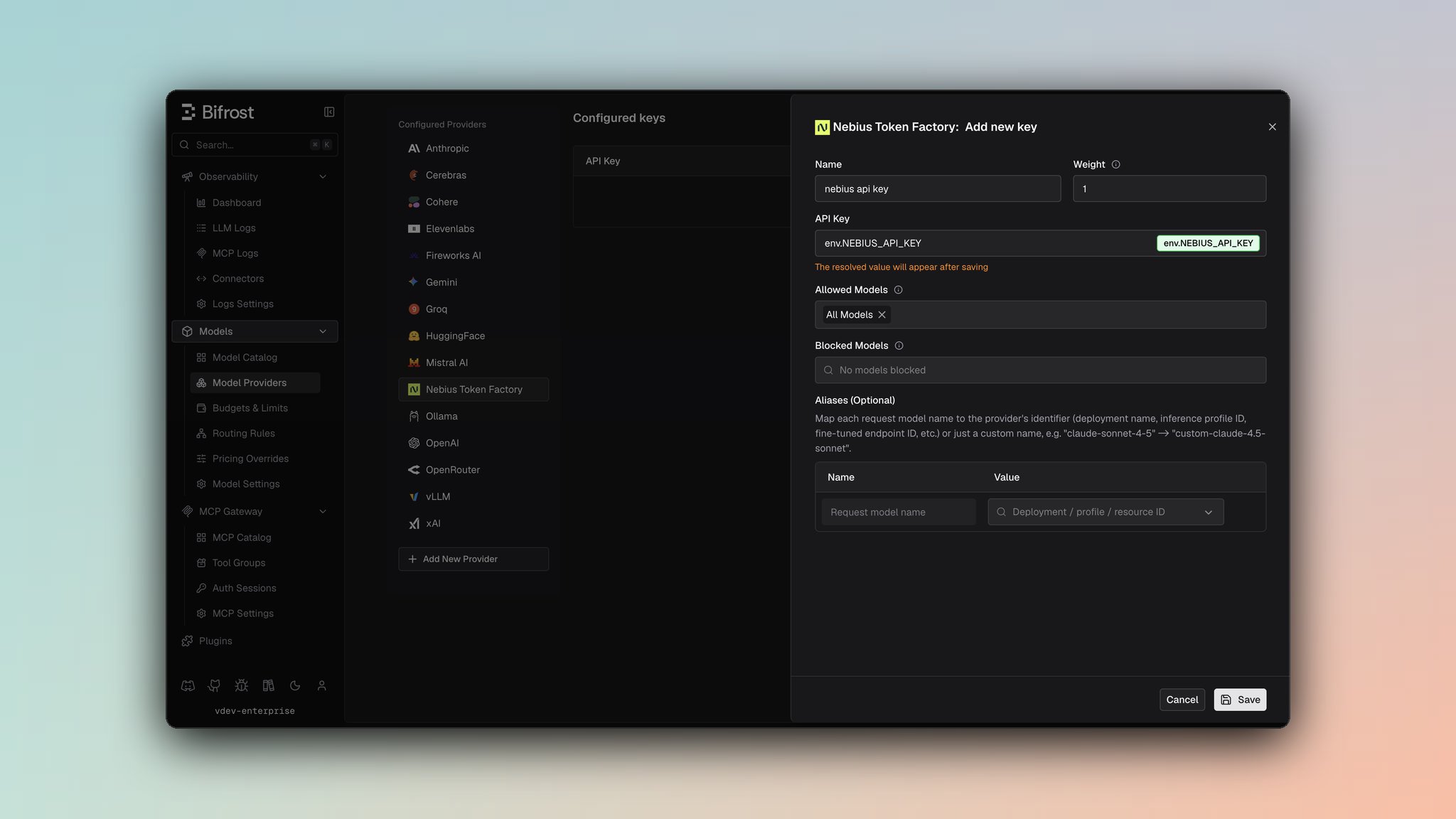 1. Navigate to **Models** > **Model Providers**. Look for **Nebius** under **Configured Providers**. If it is missing, click on **Add New Provider** and select **Nebius**.
2. Click **Add Key** or edit an existing key.
3. Set a name for your key.
4. Paste your API key directly or use an environment variable (for example, `env.NEBIUS_API_KEY`).
5. Set **Allowed Models** to **All Models** (default) or the specific model allowlist you want this key to serve.
6. Save the provider configuration.
```json theme={null}
{
"providers": {
"nebius": {
"keys": [
{
"name": "nebius-key-1",
"value": "env.NEBIUS_API_KEY",
"models": [
"*"
],
"weight": 1.0
}
]
}
}
}
```
Refer to the API documentation for [Provider Keys Management](https://docs.getbifrost.ai/api-reference/providers/create-a-key-for-a-provider).
```go theme={null}
case schemas.Nebius:
return []schemas.Key{{
Name: "nebius-key-1",
Value: *schemas.NewSecretVar("env.NEBIUS_API_KEY"),
Models: []string{"*"},
Weight: 1.0,
}}, nil
```
***
# 1. Chat Completions
## Request Parameters
Nebius supports all standard OpenAI chat completion parameters. For full parameter reference and behavior, see [OpenAI Chat Completions](/providers/supported-providers/openai#1-chat-completions).
### Nebius-Specific Parameters
**ai\_project\_id (Optional):**
Nebius allows specifying a project ID for resource organization:
```bash theme={null}
curl -X POST http://localhost:8080/v1/chat/completions \
-H "Content-Type: application/json" \
-d '{
"model": "nebius/model-name",
"messages": [...],
"ai_project_id": "project-123"
}'
```
```go theme={null}
request := &schemas.BifrostChatRequest{
Model: "model-name",
Input: messages,
Params: &schemas.ChatParameters{
ExtraParams: map[string]interface{}{
"ai_project_id": "project-123",
},
},
}
```
The `ai_project_id` is appended as a query parameter to the request URL.
### Filtered Parameters
Removed for Nebius compatibility:
* `prompt_cache_key` - Not supported
* `verbosity` - Anthropic-specific
* `store` - Not supported
* `service_tier` - Not supported
Nebius supports all standard OpenAI message types, tools, responses, and streaming formats. For details on message handling, tool conversion, responses, and streaming, refer to [OpenAI Chat Completions](/providers/supported-providers/openai#1-chat-completions).
***
# 2. Responses API
Converted internally to Chat Completions:
```
ResponsesRequest → ChatRequest → ChatCompletion → ResponsesResponse
```
Same parameter support and message handling as Chat Completions. Supports ai\_project\_id via extra\_params.
***
# 3. Text Completions
Nebius supports legacy text completion format:
| Parameter | Mapping |
| - | - |
| `prompt` | Direct pass-through |
| `max_tokens` | max\_tokens |
| `temperature`, `top_p` | Direct pass-through |
| `stop` | Stop sequences |
| `frequency_penalty`, `presence_penalty` | Penalty parameters |
***
# 4. Embeddings
Nebius supports text embeddings:
| Parameter | Notes |
| - | - |
| `input` | Text or array of texts |
| `model` | Embedding model name |
| `encoding_format` | "float" or "base64" |
| `dimensions` | Custom output dimensions (optional) |
Response returns embedding vectors with usage information.
***
# 5. Image Generation
**Request Parameters**
| Parameter | Type | Required | Notes |
| - | - | - | - |
| `model` | string | ✅ | Model identifier |
| `prompt` | string | ✅ | Text description of the image to generate |
| `size` | string | ❌ | Image size in WxH format (e.g., `"1024x1024"`). Converted to separate `width` and `height` integers |
| `output_format` | string | ❌ | Output format: `"png"`, `"jpeg"`, `"webp"`. Note: `"jpeg"` is converted to `"jpg"` |
| `response_format` | string | ❌ | Response format: `"url"` or `"b64_json"` |
| `seed` | int | ❌ | Seed for reproducible generation |
| `negative_prompt` | string | ❌ | Negative prompt |
| `num_inference_steps` | int | ❌ | Number of inference steps |
| `extra_params` | object | ❌ | Nebius-specific parameters (see below) |
**Extra Parameters (via `extra_params`)**
| Parameter | Type | Notes |
| - | - | - |
| `guidance_scale` | int | Guidance scale (0-100) |
| `ai_project_id` | string | Nebius project ID (added as query parameter) |
***
**Request Conversion**
* **Model & Prompt**: `bifrostReq.Model` → `req.Model` (pointer), `bifrostReq.Input.Prompt` → `req.Prompt` (pointer)
* **Size Conversion**: `params.size` (WxH format like `"1024x1024"`) is split into:
* `width`: Integer extracted from first part (e.g., `1024`)
* `height`: Integer extracted from second part (e.g., `1024`)
* **Output Format**:
* `params.output_format` → `req.ResponseExtension`
* Special conversion: `"jpeg"` → `"jpg"` (Nebius uses `"jpg"` not `"jpeg"`)
* **Response Format**: `params.response_format` → `req.ResponseFormat` (passed directly: `"url"` or `"b64_json"`)
* **Seed & Negative Prompt**: `params.seed` → `req.Seed`, `params.negative_prompt` → `req.NegativePrompt` (passed directly)
* **Num Inference Steps**: `params.num_inference_steps` → `req.NumInferenceSteps` (passed directly)
* **Extra Parameters**:
* `guidance_scale` → `req.GuidanceScale` (int pointer)
* `ai_project_id` → Added as query parameter `?ai_project_id={value}` to the request URL
**Response Conversion**
* **Image Data**: Each item in `response.data[]` → `ImageData` with:
* `url`: From `data[].url`
* `b64_json`: From `data[].b64_json`
* `revised_prompt`: From `data[].revised_prompt`
* `index`: Sequential index (0, 1, 2, ...)
* **ID**: `response.id` → `response.ID`
* **Provider**: Set to `nebius` in `ExtraFields`
**Endpoint**: `/v1/images/generations`
**Streaming**: Image generation streaming is not supported by Nebius.
***
# 6. List Models
Lists available Nebius models with capabilities and context lengths.
***
## Unsupported Features
| Feature | Reason |
| - | - |
| Speech/TTS | Not offered by Nebius API |
| Transcription/STT | Not offered by Nebius API |
| Batch Operations | Not offered by Nebius API |
| File Management | Not offered by Nebius API |
***
## Caveats
**Severity**: Medium
**Behavior**: Cache control directives are removed from messages
**Impact**: Prompt caching features don't work
**Code**: Stripped during JSON marshaling
**Severity**: Low
**Behavior**: OpenAI-specific fields filtered out
**Impact**: prompt\_cache\_key, verbosity, store removed
**Code**: filterOpenAISpecificParameters
**Severity**: Low
**Behavior**: User field > 64 characters silently dropped
**Impact**: Longer user identifiers are lost
**Code**: SanitizeUserField enforces 64-char max
This documentation is built and hosted on [Mintlify](https://mintlify.com), a developer documentation platform.
1. Navigate to **Models** > **Model Providers**. Look for **Nebius** under **Configured Providers**. If it is missing, click on **Add New Provider** and select **Nebius**.
2. Click **Add Key** or edit an existing key.
3. Set a name for your key.
4. Paste your API key directly or use an environment variable (for example, `env.NEBIUS_API_KEY`).
5. Set **Allowed Models** to **All Models** (default) or the specific model allowlist you want this key to serve.
6. Save the provider configuration.
```json theme={null}
{
"providers": {
"nebius": {
"keys": [
{
"name": "nebius-key-1",
"value": "env.NEBIUS_API_KEY",
"models": [
"*"
],
"weight": 1.0
}
]
}
}
}
```
Refer to the API documentation for [Provider Keys Management](https://docs.getbifrost.ai/api-reference/providers/create-a-key-for-a-provider).
```go theme={null}
case schemas.Nebius:
return []schemas.Key{{
Name: "nebius-key-1",
Value: *schemas.NewSecretVar("env.NEBIUS_API_KEY"),
Models: []string{"*"},
Weight: 1.0,
}}, nil
```
***
# 1. Chat Completions
## Request Parameters
Nebius supports all standard OpenAI chat completion parameters. For full parameter reference and behavior, see [OpenAI Chat Completions](/providers/supported-providers/openai#1-chat-completions).
### Nebius-Specific Parameters
**ai\_project\_id (Optional):**
Nebius allows specifying a project ID for resource organization:
```bash theme={null}
curl -X POST http://localhost:8080/v1/chat/completions \
-H "Content-Type: application/json" \
-d '{
"model": "nebius/model-name",
"messages": [...],
"ai_project_id": "project-123"
}'
```
```go theme={null}
request := &schemas.BifrostChatRequest{
Model: "model-name",
Input: messages,
Params: &schemas.ChatParameters{
ExtraParams: map[string]interface{}{
"ai_project_id": "project-123",
},
},
}
```
The `ai_project_id` is appended as a query parameter to the request URL.
### Filtered Parameters
Removed for Nebius compatibility:
* `prompt_cache_key` - Not supported
* `verbosity` - Anthropic-specific
* `store` - Not supported
* `service_tier` - Not supported
Nebius supports all standard OpenAI message types, tools, responses, and streaming formats. For details on message handling, tool conversion, responses, and streaming, refer to [OpenAI Chat Completions](/providers/supported-providers/openai#1-chat-completions).
***
# 2. Responses API
Converted internally to Chat Completions:
```
ResponsesRequest → ChatRequest → ChatCompletion → ResponsesResponse
```
Same parameter support and message handling as Chat Completions. Supports ai\_project\_id via extra\_params.
***
# 3. Text Completions
Nebius supports legacy text completion format:
| Parameter | Mapping |
| - | - |
| `prompt` | Direct pass-through |
| `max_tokens` | max\_tokens |
| `temperature`, `top_p` | Direct pass-through |
| `stop` | Stop sequences |
| `frequency_penalty`, `presence_penalty` | Penalty parameters |
***
# 4. Embeddings
Nebius supports text embeddings:
| Parameter | Notes |
| - | - |
| `input` | Text or array of texts |
| `model` | Embedding model name |
| `encoding_format` | "float" or "base64" |
| `dimensions` | Custom output dimensions (optional) |
Response returns embedding vectors with usage information.
***
# 5. Image Generation
**Request Parameters**
| Parameter | Type | Required | Notes |
| - | - | - | - |
| `model` | string | ✅ | Model identifier |
| `prompt` | string | ✅ | Text description of the image to generate |
| `size` | string | ❌ | Image size in WxH format (e.g., `"1024x1024"`). Converted to separate `width` and `height` integers |
| `output_format` | string | ❌ | Output format: `"png"`, `"jpeg"`, `"webp"`. Note: `"jpeg"` is converted to `"jpg"` |
| `response_format` | string | ❌ | Response format: `"url"` or `"b64_json"` |
| `seed` | int | ❌ | Seed for reproducible generation |
| `negative_prompt` | string | ❌ | Negative prompt |
| `num_inference_steps` | int | ❌ | Number of inference steps |
| `extra_params` | object | ❌ | Nebius-specific parameters (see below) |
**Extra Parameters (via `extra_params`)**
| Parameter | Type | Notes |
| - | - | - |
| `guidance_scale` | int | Guidance scale (0-100) |
| `ai_project_id` | string | Nebius project ID (added as query parameter) |
***
**Request Conversion**
* **Model & Prompt**: `bifrostReq.Model` → `req.Model` (pointer), `bifrostReq.Input.Prompt` → `req.Prompt` (pointer)
* **Size Conversion**: `params.size` (WxH format like `"1024x1024"`) is split into:
* `width`: Integer extracted from first part (e.g., `1024`)
* `height`: Integer extracted from second part (e.g., `1024`)
* **Output Format**:
* `params.output_format` → `req.ResponseExtension`
* Special conversion: `"jpeg"` → `"jpg"` (Nebius uses `"jpg"` not `"jpeg"`)
* **Response Format**: `params.response_format` → `req.ResponseFormat` (passed directly: `"url"` or `"b64_json"`)
* **Seed & Negative Prompt**: `params.seed` → `req.Seed`, `params.negative_prompt` → `req.NegativePrompt` (passed directly)
* **Num Inference Steps**: `params.num_inference_steps` → `req.NumInferenceSteps` (passed directly)
* **Extra Parameters**:
* `guidance_scale` → `req.GuidanceScale` (int pointer)
* `ai_project_id` → Added as query parameter `?ai_project_id={value}` to the request URL
**Response Conversion**
* **Image Data**: Each item in `response.data[]` → `ImageData` with:
* `url`: From `data[].url`
* `b64_json`: From `data[].b64_json`
* `revised_prompt`: From `data[].revised_prompt`
* `index`: Sequential index (0, 1, 2, ...)
* **ID**: `response.id` → `response.ID`
* **Provider**: Set to `nebius` in `ExtraFields`
**Endpoint**: `/v1/images/generations`
**Streaming**: Image generation streaming is not supported by Nebius.
***
# 6. List Models
Lists available Nebius models with capabilities and context lengths.
***
## Unsupported Features
| Feature | Reason |
| - | - |
| Speech/TTS | Not offered by Nebius API |
| Transcription/STT | Not offered by Nebius API |
| Batch Operations | Not offered by Nebius API |
| File Management | Not offered by Nebius API |
***
## Caveats
**Severity**: Medium
**Behavior**: Cache control directives are removed from messages
**Impact**: Prompt caching features don't work
**Code**: Stripped during JSON marshaling
**Severity**: Low
**Behavior**: OpenAI-specific fields filtered out
**Impact**: prompt\_cache\_key, verbosity, store removed
**Code**: filterOpenAISpecificParameters
**Severity**: Low
**Behavior**: User field > 64 characters silently dropped
**Impact**: Longer user identifiers are lost
**Code**: SanitizeUserField enforces 64-char max
This documentation is built and hosted on [Mintlify](https://mintlify.com), a developer documentation platform.